
One Touch Switch
How to locate your account info
We're here to help. Here's exactly where to find the details your new provider will ask for.
To switch your broadband service using the One Touch Switch system, you'll need to provide your new provider with three pieces of information from your Inspire Telecom account: your account number, your billing name, and your billing address.
The easiest way to find these is on your most recent paper or email bill from Inspire Telecom.
Where to look on your bill
Here's an example of an Inspire Telecom bill, with the details your new provider needs highlighted.
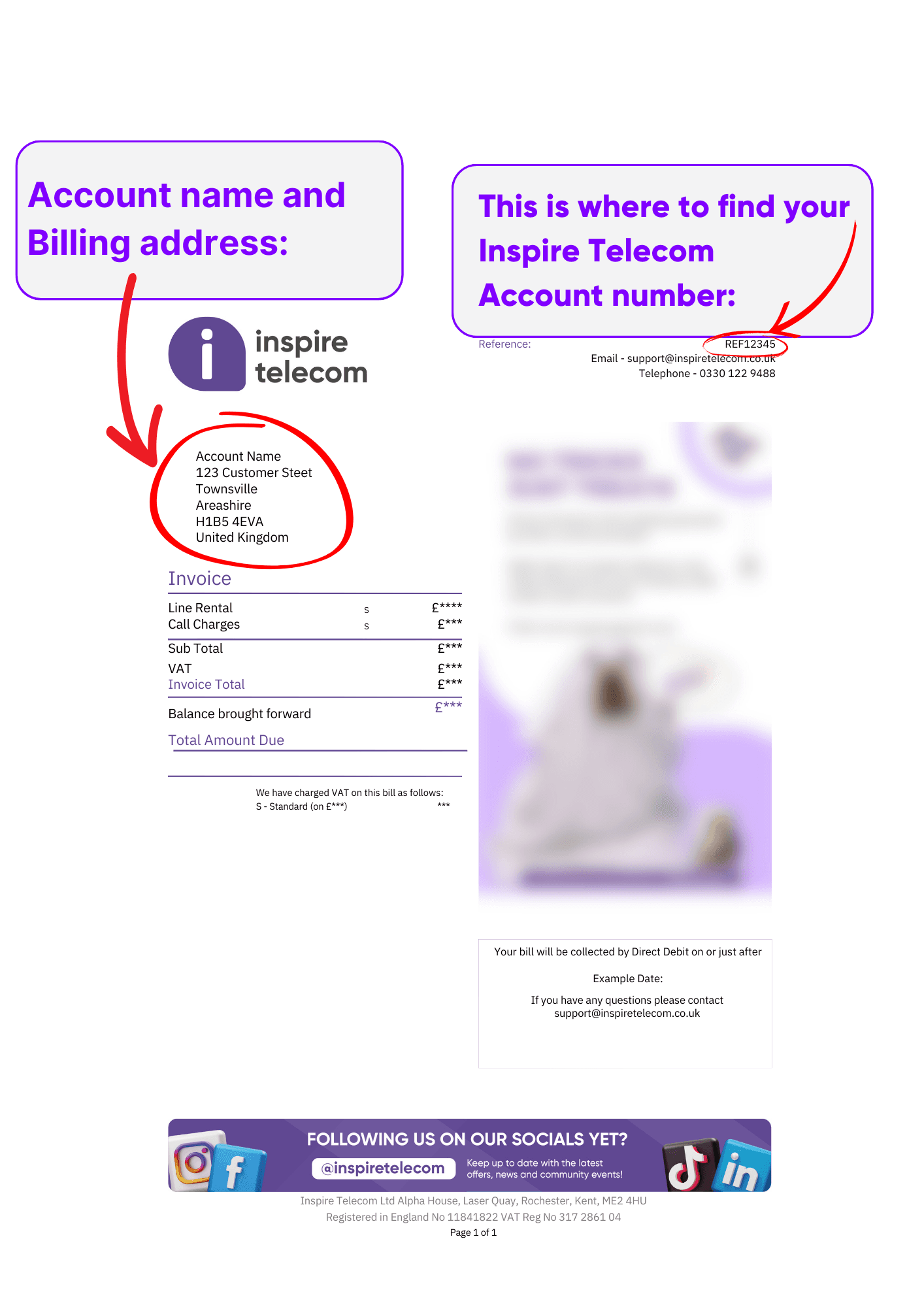
Billing name and address
Located on the left side of your bill. This should match exactly the name and address used when you signed up with Inspire Telecom.
Account number
At the top right of your bill, look for the word "Reference:" followed by your account number. That's the number your new provider needs.
Can't find a recent bill?
Check the email address you signed up with, as your most recent bill will have been sent there. If you've lost it, contact our team and we'll send a fresh copy.
Need help finding your details?
Our UK-based team can talk you through it in under a minute.
What is One Touch Switch?
New here? Learn how One Touch Switch makes changing providers effortless.
One Touch Switch explained